The Cicada Vaccine Forecasting Engine and Guide - Local Development build (v0.1.0) built by the FHIR (HL7® FHIR® Standard) Build Tools. See the Directory of published versions
Logical Specification Concepts
There are a number of concepts that are involved in the evaluation and prediction of immunizations. Some of these terms make logical sense, but others do not. Here's a description of some of them. Again, this was all taken from the Clinical Decision Support for Immunization (CDSi).
Target Dose
A TargetDose is said to be 'unsatisfied' until a dose matches all of its required criteria. At that time, the TargetDose is incremented by one. Below is a basic example from the CDC
How a Vaccine Dose Administered Satisfies a Target Dose - TODO (add image) 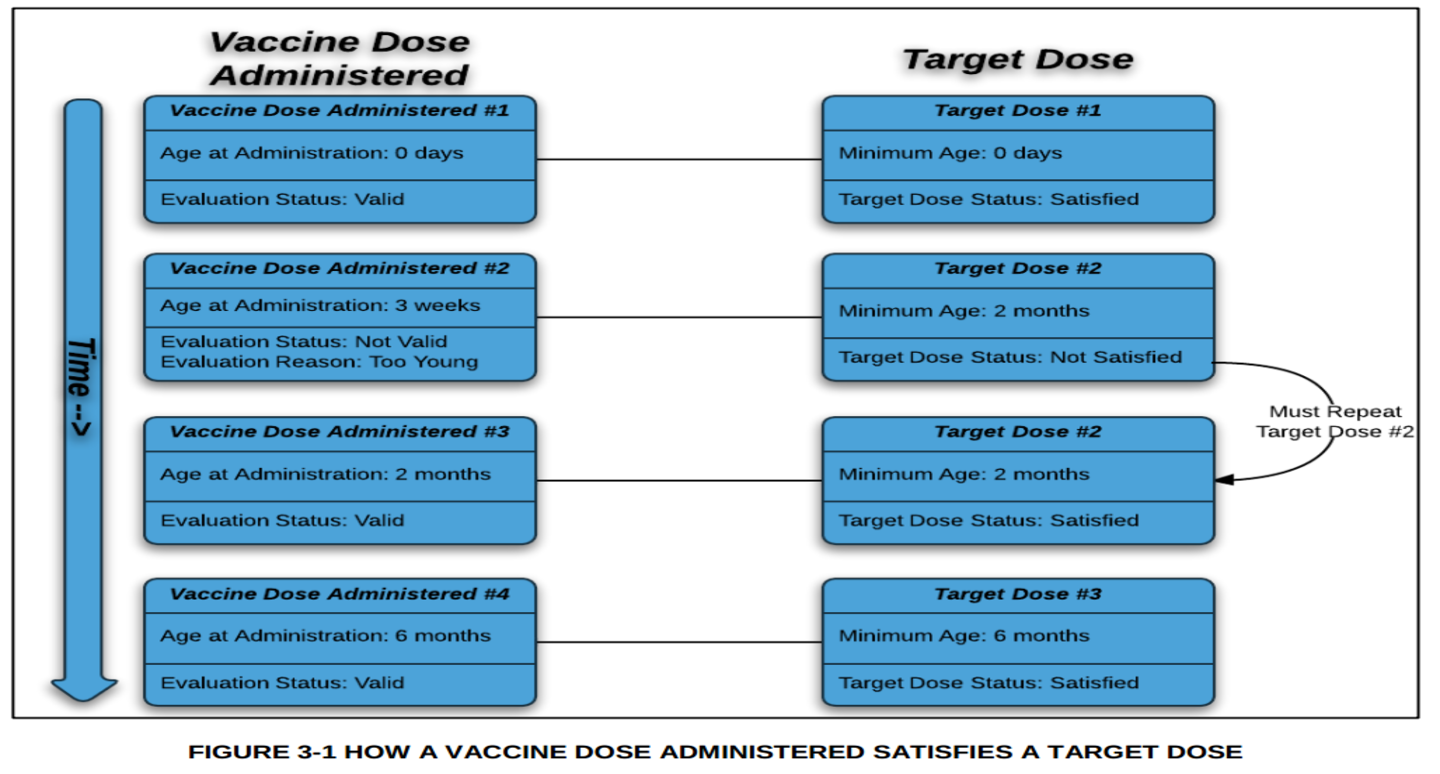
- Target dose - this is a term that makes some intrinsic sense, and then has been used in confusing ways, at least I thought so. The target dose is the next recommended dose in a series. When we evaluate past vaccines, we check to see if a particular vaccine that was given meets the requirements of the target dose. If it does, that target dose is considered satisfied, and we move onto the next target dose.
A patient series is considered complete when the TargetDose index is >= the total number of doses in the series.
*As a side note, anytime you see the term 'Vaccine Dose Administered' replace it with 'Dose Given', and it makes much more sense
Statuses
| Status | Meaning |
|---|---|
| Extraneous | Meaning the dose doesn't count towards the series, but doesn't need to be repeated (including maximum age and extra doses) |
| Not Valid | Not administered according to ACIP recommendations, does not count towards the series, will need to be repeated |
| Sub-standard | Dose had a condition (e.g., expired, sub-potent, and recall) making it invalid, will need to be repeated |
| Valid | Meets ACIP requirements for that dose |
| Status | Meaning |
|---|---|
| Not Satisfied | No dose given meets the target dose requirements |
| Satisfied | A dose has been given that meets target dose requirements |
| Skipped | No dose given meets requirements, but due to age/previous doses/other reasons, this target dose does not need to be satisfied and is skipped |
| Status | Meaning |
|---|---|
| Aged Out | Patient exceeded the maximum age prior to completing this series |
| Complete | Patient has met all of the ACIP recommendations for this series |
| Contraindicated | Patient history indicates no more immunizations in this series should be given |
| Immune | Patient has evidence of immunity, no further immunizations are needed for this series |
| Not Complete | Patient has not met all of the ACIP recommendations for this series |
| Not Recommended | Patient's immunization history provides sufficient immunity, and further doses in this series are not recommended |
Selecting Supporting Data
Much of the CDSi supporting data includes effective dates and cessation dates. These are used to determine whether a particular rule or component is relevant at the time of evaluation. This is critical: before evaluating any rule (age, interval, vaccine type, etc.), you must first check whether it is relevant based on these dates.
| Business Rule ID | Business Rule |
|---|---|
| RELEVANT-1 | A component applies to a previously given vaccination if there is no Effective Date or Cessation Date, they are both "n/a", or the date given is between the two. Default effective date: 01/01/1900. Default cessation date: 12/31/2999. |
| RELEVANT-2 | A component applies to forecasting a vaccination if there is no Effective Date or Cessation Date, they are both "n/a", or the assessment date is between the two. Default effective date: 01/01/1900. Default cessation date: 12/31/2999. |
These rules apply broadly: intervals, vaccine types, conditional skip conditions, and other supporting data components all have effective/cessation dates that must be checked before using them.
Date Calculations
As anyone who has worked with dates can tell you, they're a huge pain in the ass. I've created a dedicated class for dealing with them called VaxDate. The CDC has stated how they expect for dates to be processed, I've reproduced this below.
| Business Rule | Example |
|---|---|
| When adding only years, month and days stay constant |
01/01/2000 + 3 years = 01/01/2003 |
| When adding months, day must stay constant |
01/01/2000 + 6 months = 07/01/2000 11/01/2000 + 6 months = 05/01/2001 |
| When adding weeks or days, add that total number of days to the existing date |
01/01/2000 + 3 days = 01/04/2000 01/01/2000 + 3 weeks = 01/22/2000 02/01/2000 + 5 weeks = 03/07/2000 (leap year) 02/01/2001 + 5 weeks = 03/08/2001 (not a leap year) |
| Subtracting days is just subtracting days from the date (negative addition) |
01/15/2000 - 4 days = 01/11/2000 |
| If the calculated date isn't a real date, it is moved to the first of the next month |
03/31/2000 + 6 months = 10/01/2000 (September 31 does not exist) 08/31/2000 + 6 months = 03/01/2001 (February 31 does not exist) |
| Dates must be calculated by first adding years, then months, then weeks/days |
01/31/2000 + 6 months - 4 days = 07/27/2000 |
It's important to note, and it took me a while to catch onto their wording, there are ages and age dates. They are what they say they are, but I struggled with them at first. An age (or an interval) is a string description of a period of time ('4 years', '19 years - 4 days', etc). These are supposed to be added (or subtracted) to a date (usually the DOB, although sometimes the date given of the previous dose). Also, these terms probably won't all make as much sense until you work through it some more.
| Business Rule | Calculation |
|---|---|
| Maximum age date | DOB + maximum age |
| Latest recommended age date | DOB + latest recommended age |
| Earliest recommended age date | DOB + earliest recommended age |
| Minimum age date | DOB + minimum age |
| Absolute minimum age date | DOB + absolute minimum age |
| Allowable vaccine type begin age date | DOB + vaccine type begin age (only applied for allowable vaccines) |
| Allowable vaccine type end age date | DOB + vaccine type end age (only applied for allowable vaccines) |
| Contraindication begin age date | DOB + contraindication begin age (for either an antigen or a vaccine) |
| Contraindication end age date | DOB + contraindication end age (for either an antigen or a vaccine) |
| Indication begin age date | DOB + indication begin age |
| Indication end age date | DOB + indication end age |
| Reference dose date: when evaluating intervals, sometimes this is from the previous dose, sometimes from another dose in the series (usually the first). | |
| From Previous Dose: The reference date is calculated from the immediate previous dose if: - the interval entry's "fromPrevious" is "Y" - the previous dose has status of 'Valid' or 'Not Valid' - the current dose is not an inadvertent administration. Example: "interval": [{"fromPrevious": "Y", "fromTargetDose": null, "minInt": "4 weeks"}] |
|
| From Target Dose: The reference date is calculated from a specific dose in the series if: - "fromPrevious" is "N" - "fromTargetDose" is not null. Example: "interval": [{"fromPrevious": "N", "fromTargetDose": "1", "minInt": "6 months"}] |
|
| From Most Recent: The reference date is calculated from the most recent dose of the same vaccine type if: - "fromPrevious" is "N" - "fromMostRecent" is not null - the current dose is not an inadvertent administration. Example: "interval": [{"fromPrevious": "N", "fromTargetDose": null, "fromMostRecent": "21; 94; 121", "absMinInt": "0 days", "minInt": "8 weeks"}] |
|
| From Relevant Observation: The reference date is calculated from an observation date if: - "fromPrevious" is "N" - "fromRelevantObs" is not null. Example: "interval": [{"fromPrevious": "N", "fromTargetDose": null, "fromMostRecent": null, "fromRelevantObs": {"text": "Date of hematopoietic stem cell transplant", "code": "171"}, "earliestRecInt": "6 months", "latestRecInt": "12 months"}] |
|
| Absolute minimum interval date | Date reference dose was given + absolute minimum interval. |
| Minimum interval date | Date reference dose was given + minimum interval. |
| Earliest recommended interval date | Date reference dose was given + earliest recommended interval. |
| Latest recommended interval date | Date reference dose was given + latest recommended interval. |
| Latest minimum interval date | If there is more than one interval specified (such as from previous and from a target dose), whichever comes later. |
| Conflict begin interval date | Date given of the conflicting dose + live virus conflict begin interval. |
| Conflict end interval date (valid conflicting dose) | Date given of the conflicting dose + live virus MINIMUM CONFLICT end interval if the conflicting dose HAS evaluation status of valid. |
| Conflict end interval date (invalid conflicting dose) | Date given of the conflicting dose + live virus CONFLICT end interval if the conflicting dose DOES NOT HAVE evaluation status of valid. |
| Latest conflict end interval date | If there is more than one conflict interval calculated (such as from multiple previous live virus doses), whichever comes later. |
| Preferable vaccine type begin age date | DOB + vaccine type begin age of a preferable vaccine. |
| Conditional skip begin age date | DOB + begin age of the conditional skip condition. |
| Conditional skip end age date | DOB + end age of the conditional skip condition. |
| Conditional skip interval date | Date given of the immediate previous dose + interval of the conditional skip condition. |